| assets-cg | ||
| images | ||
| src | ||
| .gitignore | ||
| CMakeLists.txt | ||
| LICENSE.txt | ||
| README.md | ||
| SquishIt.ini | ||

Squish It !!
Add-in Compressor/Decompressor for fx-CG100 / Graph Math+
Overview
The Graph Math+, released in late 2024, is very similar to the G90+E but suffers from a severe reduction in available user flash memory: only 4.5 MB, compared to 16 MB previously. For regular users, this limitation is acceptable. For power users and developers who maintain and test multiple add-ins, this drastically reduced storage becomes a daily obstruction.
Squish It !! was created to address this limitation by providing on-calculator compression and decompression for add-ins, allowing users to effectively expand their usable storage. The tool introduces a custom compressed format (G3Z) and integrates several efficient compression algorithms.
Squish It !! is based on:
- cZlib 1.2.5 --- https://git.planet-casio.com/Slyvtt/cZlib
- cLZ4 1.10.0 --- https://git.planet-casio.com/Fcalva/cLZ4
Compatibility and Requirements
| Model | Supported |
|---|---|
| Graph Math+ | ✔ Yes |
| fx-CG100 | ✔ Yes |
| fx-CG10 / 20 / 50 | ❌ No (OS crash when writing G3A) |
Minimum OS version: 2.00 Prerequisite: Jailbreak via the latest MPM (Planète Casio Forge)
How Squish It !! Works
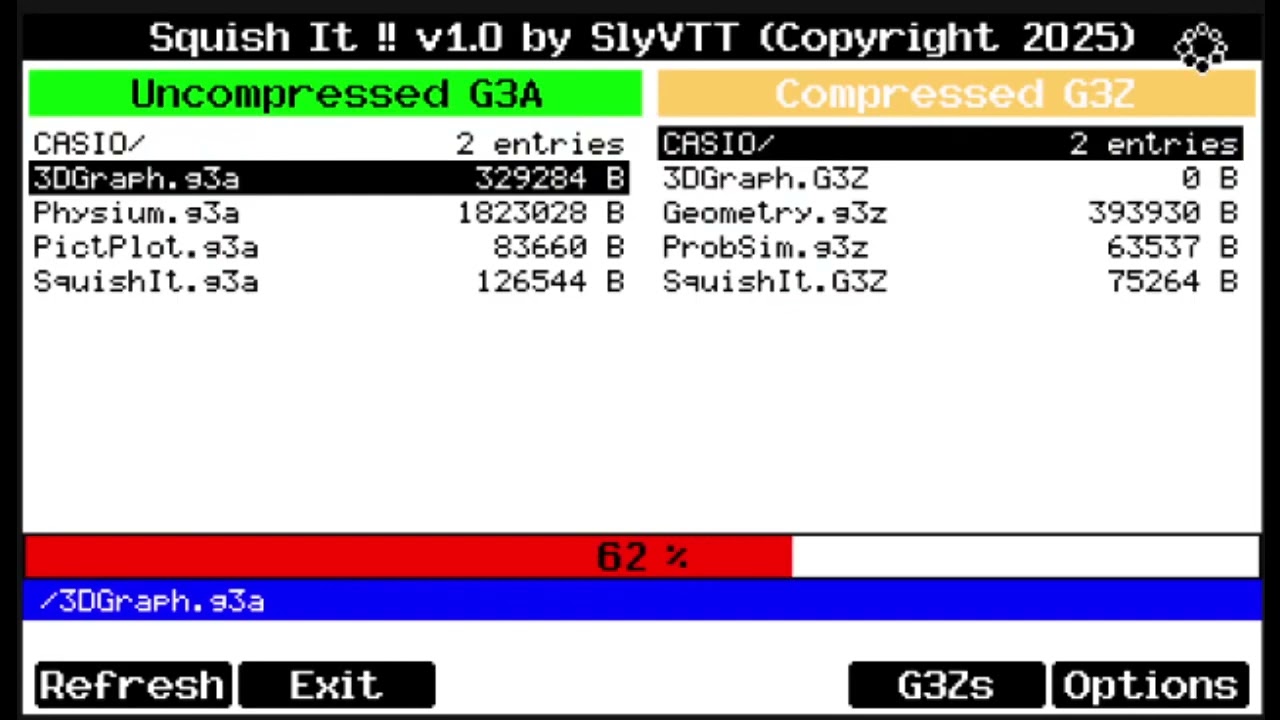
The program lists:
- G3A files --- uncompressed add-ins
- G3Z files --- compressed add-ins using the Squish It !! proprietary format
The interface allows:
- Compressing a G3A → G3Z
- Decompressing a G3Z → G3A
The operation starts by pressing EXE or OK. Squish It !! automatically detects:
- File type
- Compression algorithm
- Required buffer size
Available Compression Algorithms
- ZlibMax --- zlib, maximum compression ratio
- ZlibFst --- zlib, optimized for speed
- LZ4Max --- LZ4 HC, level 9
- LZ4Fst --- LZ4 HC, level 3 (fast)
Reliability
To ensure reliability, 31 different add-ins were processed through all methods:
- Compressed
- Decompressed
- Executed after decompression
All tests passed successfully. A safety mechanism prevents compressing Squish It !! itself.
Performance Evaluation
Average Compression
Typical ratios are:
- 50% to 60% on average
- Possible compression range: 25% to 80%, depending on the structure of the add-in
Comparison Table
| Method | Total Size (kB) | Avg. Compression | Functional Add-ins | Compression Time (s) | Decompression Time (s) |
|---|---|---|---|---|---|
| Uncompressed | 10136.1 | 0% | 31 | — | — |
| ZLibMax | 4192.2 | 58.6% | 31 | 940 | 1859 |
| ZLibFast | 4480.1 | 55.80% | 31 | 924 | 1935 |
| LZ4Max | 4865.9 | 51.99% | 31 | 999 | 2024 |
| LZ4Fast | 4992.4 | 50.75% | 31 | 1010 | 1921 |
Charts and Benchmarks
Compression Ratios

Compression Time

Decompression Time

Detailed Benchmark Data
ZLibMax (cZlib 1.2.5 --- Z_BEST_COMPRESSION)

ZLibFast (cZlib 1.2.5 --- Z_BEST_SPEED)

LZ4Max (cLZ4 1.10.0 --- HC = 9)

LZ4Fast (cLZ4 1.10.0 --- HC = 3)

TODO List --- Future Enhancements
Short-Term (High Priority)
- Add an abort key for current operations with safe cleanup
- Add estimated processing times based on benchmark data
- Detailed G3Z metadata view (original name, size, algorithm, Squish version)
- Display of free flash memory
- Space availability check before operation
- Support for multiple algorithms (zlib + LZ4)
- Compression level selection (multiple press on PAGE_UP to select)
- Multi-language support (French / English)
Long-Term (Possible Future Work)
- Overclock support to accelerate compression/decompression
- Persistent user settings (language, overclock, algorithm saved to SquishIt.ini)
- Add integrity checksum verification after decompression
- Folder support and multi-file compression
- Direct execution of an add-in by decompressing into RAM
- Make Squish It !! work on fx-CG10/20/50 by loading binary code to RAM
- Merge Squish It !! inside MPM.bin
G3Z Proprietary File Format
Format Version 1.00
- Bytes 0--3: Magic tag
"SQIT" - Bytes 4--7: Squish It !! version string (e.g.,
"1.00") - Bytes 8--9: Filename length (
N, little endian) - Bytes 10--(9+N): Original filename
- Bytes 10+N -- 13+N: Original file size (uncompressed)
- Bytes 14+N -- end: Compressed data
Format Version 1.10
- Bytes 0--3: Magic tag
"SQIT" - Bytes 4--7: Version string (
"1.10") - Byte 8: Compression algorithm used
A--- ZLIB Best CompressionB--- ZLIB Best SpeedC--- LZ4 High CompressionD--- LZ4 Fast Compression
- Byte 9: Checksum enabled flag (0x01 yes / 0x00 no)
- Bytes 10--13: Checksum value (or
0xFFFFFFFF) - Bytes 14--20: Reserved (
0xFF) - Bytes 21--22: Filename length (
N, little endian) - Bytes 23--(22+N): Filename
- Bytes 23+N -- 26+N: Original file size
- Bytes 27+N -- end: Compressed data
Format Version 1.11
Similar to 1.10
Format Version 1.12
Similar to 1.10 and 1.11
Format Version 1.13
Similar to 1.10, 1.11 and 1.12
Format Version 1.20
- Bytes 0--3: Magic tag
"SQIT" - Bytes 4--7: Version string (
"1.20") - Byte 8: Compression algorithm (
A=ZLIB Max,B=ZLIB Fast,C=LZ4 Max,D=LZ4 Fast) - Byte 9: Checksum enabled flag (
0x01yes /0x00no) - Bytes 10--13: xxHash32 of the original uncompressed data (or value
0xFFFFFFFFif flag is0x00) - Bytes 14--20: Reserved for future usage (all set to the value
0xFF) - Bytes 21--22: Filename length (
N, little endian) - Bytes 23--(22+N): Filename
- Bytes 23+N -- 26+N: Original file size
- Bytes 27+N -- end: Compressed data
Format Version 1.21
Similar to 1.20
Version History
Version 1.00
- Initial public release
- Compression / decompression system
- Zlib (best compression mode)
- Basic interface
Version 1.10
- Added Zlib Fast mode
- Added LZ4 Max and LZ4 Fast modes
- Introduced G3Z file format version 1.10
Version 1.11
- Added free flash memory display
- Added file information popup
- Added pre-operation free space verification
Version 1.12
- Added an Abort Key to stop current compression/decompression operation (mapped to BACK key)
- Added an estimator of the operation duration (Compression & Decompression)
- Corrected some hidden bugs when Information popup window was opened
- Remove temporary files created before user abort
Version 1.13
- Corrected a bug in the calculation of compression ratio of G3Z file (visible in File Info Popup)
- Improvement of texts within the program
Version 1.20
New features
- Added xxHash32 integrity checksum: every compressed G3Z file now stores a 32-bit hash of the original uncompressed data, verified automatically on decompression
- Checksum is algorithm-agnostic: works identically for zlib and LZ4 compressed files
- Old G3Z files (versions 1.10--1.13) without a checksum are still decompressed normally (flag
0x00skips verification) - Named constants for algorithm byte codes (
ALGO_BYTE_ZLIB_MAX/FAST,ALGO_BYTE_LZ4_MAX/FAST) replacing bare character literals in the file format layer - Checksum value in the file information popup is now displayed in hexadecimal (e.g.
0xA3F2C1B0) consistent with how hash values are conventionally represented
Bug fixes
- Fixed use-after-free: partial
.g3zoutput is now correctly deleted before the path buffer is freed when compression is aborted - Fixed
jpopup_add_empty_line(): empty separator lines were allocated but never inserted into the list and never displayed - Fixed popup widget used before NULL guard:
jpopup_set_size()andjpopup_set_font()were called before the NULL check ininit_app() - Fixed missing
FileDataargument in the non-FXCG100 build path ofSquishIt_GetFileInformation()(crash / undefined behaviour on simulator) - Fixed buffer overflow in
getfileinformation():name_lenread from file was not clamped beforefread()into the 256-byteoriginalfilenamefield - Fixed
delete_file()returning the rawremove()value (-1 on failure) instead of a definedSQUISHIT_*error code - Fixed unchecked
fwrite()in LZ4 compression and decompression loops: write failures now propagate asSQUISHIT_WRITE_ERROR - Fixed unchecked
fwrite()when writing the filename into the G3Z header - Fixed LZ4 chunk size stored/read as platform-dependent
int; now explicitlyuint32_t(no format change on SH4 whereintis 32 bits, but correct by specification) - Fixed
strcpy()without bounds check onFileData->filename; replaced withstrncpy()
Code quality
- Refactored
event_handling()(~215 lines) into three focused static helpers:handle_compress(),handle_decompress(),handle_info_popup() - Removed stale TODO comment from
read_checksum()(error handling was already complete) - Removed dead commented-out
decompress_file_zlib()function - Added
statictoclamp()injprogressbar.cto avoid link-scope name pollution - Removed dead
l = NULLassignment afterfree(l)injpopup_poly_destroy() - Corrected misleading copy-paste header comment in
jpopup.h(was describing a progress bar) - Replaced unexplained commented-out
jwidget_emit()calls with an explanatory comment - Updated G3Z file format to version 1.20
Version 1.21
New features in 1.21
- Multi-language support (English / French): all user-facing strings are now fully translated; the active language is selectable from the Settings menu
- Persistent user settings: language, CPU overclock level and default compression algorithm are saved automatically to
SquishIt.inion the calculator storage and restored on the next launch - INI configuration file (
SquishIt.ini): plain-text format with[Key] valueentries and#comment lines; human-readable and hand-editable directly on a PC; a default file with full comments is provided and auto-created on first launch if absent - CPU overclock is now accessible from the Settings menu (SHIFT+MENU), allowing the user to select speeds F1 (default) through F5 without leaving the application
- Default compression algorithm is now remembered across sessions and pre-selected on startup
Code quality in 1.21
- Introduced
src/lang/subsystem:lang.h(string ID enum + API),lang_en.h,lang_fr.h(translation tables),lang.c(runtime dispatch); adding a new language requires only a newlang_XX.hfile - Introduced
src/core/ini_file.h/ini_file.c: self-contained INI parser and writer; all filesystem calls are wrapped ingint_world_switchfor safe OS-world access - Widget strings (
jpopuptitle,jjackintheboxmenuhint bar,jfileselectempty-folder and save-as labels) are now configurable at runtime via dedicated setters, enabling live language switching without rebuilding the widget tree
Disclaimer
This software is a Work in Progress and is provided "as is", without warranty of any kind. Although extensive testing has been performed, unexpected behavior may occur.
Please:
- Avoid using it on sensitive or irreplaceable data
- Ensure regular backups of your calculator storage
- Send bugs reports when you find some (with possibly the way to reproduce it as accurately as possible)
The author cannot be held responsible for any data loss or damage.